


This January, all proceeds from paid subscriptions will support my friend David's GoFundMe. After losing his mother, caring for his father, and losing his family home, David is fighting to keep his parents' two beagles. Your subscription will help him raise $3,000 for professional dog training—offering hope after his most challenging year.
➡️ You can also check out his GoFundMe directly here.
In our last lesson, we explored frameworks for structuring your prompt operations. Before we start building a prompt library or creating templates, we need to step back and think systematically about how we'll organize our prompts … or at least get started. This is where taxonomies comes in.
So you might be wondering what a taxonomy is and what that has to do with content or AI. Simply put, its a way of organizing things … in this case prompts.
Think about how a grocery store organizes its products. It's not random - there's a careful system that groups similar items together and creates logical pathways for shoppers.
Produce is grouped together, with fruits in one section and vegetables in another. Dairy products have their own area. Frozen foods are grouped by type - vegetables, ready meals, desserts.
This organization isn't just about putting things in neat rows - it's about understanding how people use these items and navigate the physical space.
For example, a grocery store's layout creates meaningful connections. Fresh vegetables sit next to fresh fruits, forming a produce section. Nearby, you'll often find the deli with fresh-made salads.
This shows how these chains are understanding the ways shoppers think about and use these items together, not just like with like.
Someone making a salad might need tomatoes (produce), croutons (bakery), and salad dressing (condiments), so these sections are often within easy reach of each other.
The same kind of multidimensional thinking applies to organizing prompts. While you might have clear categories like "content creation" or "content analysis," the real power comes from understanding how these categories relate to each other in practice.
Just as the grocery store creates useful adjacencies between related products, your prompt taxonomy should reflect the natural connections in your content workflows.
And just as grocery stores have different sections for different types of products, your prompt taxonomy will have different categories for different types of prompts.
Why Taxonomy Matters in Prompt Operations
Creating a taxonomy is about being organized, but its also about creating a system that supports your workflows. When a grocery store decides where to place items, they think about how people shop - placing frequently bought items like milk toward the back, grouping items that are often bought together, and putting impulse purchases near the checkout.
Similarly, when creating your prompt taxonomy, you need to think about how you and your team work with prompts:
What prompts do you use most often?
Which prompts are typically used together?
How do different team members think about and search for prompts?
What relationships exist between different types of content work?
Let's see how the grocery store principle works with prompts in a content marketing operation.
Imagine you regularly create product announcements across different channels. You might have prompts for social media posts, email newsletters, blog articles, and press releases. A simple categorical organization might just list these as different types of content:
Social Media Prompts
Email Prompts
Blog Prompts
Press Release Prompts
But this one-dimensional organization misses important relationships in how these prompts work together. In practice, when launching a new product, you'll need prompts that help you maintain consistent messaging across all these channels while adapting the tone and format for each one.
A more useful organization would also consider these relationships. You might group your prompts both by channel (like grocery store departments) and by common workflows (like recipe ingredients). For a product launch, you might have:
Product Launch Bundle:
Core messaging prompt (develops key points)
Channel adaptation prompts (adjusts tone and format)
Audience targeting prompts (customizes for different segments)
Timeline prompts (creates content schedule)
These prompts naturally go together, just like spaghetti ingredients. While they could live in different "departments" of your library, they should be easy to find and use together across your prompt library. Your taxonomy might even include pre-made "recipe cards" - templates that combine these prompts in proven workflows.
This multidimensional organization means someone working on a product launch can easily find not just individual prompts, but entire workflows. Just as a grocery store might feature a display with everything needed for a summer barbecue, your prompt taxonomy should support common content creation scenarios.
This kind of thoughtful organization becomes even more valuable as your prompt library grows. A good taxonomy helps new team members understand not just what prompts are available, but how they work together to achieve specific content goals.
Creating Your Basic Taxonomy Structure
Before we explore complex relationships between prompts, let's start with a basic hierarchical organization - like creating the main departments and aisles of our prompt store.
A linear taxonomy starts with broad categories and moves to increasingly specific subcategories. For content operations, we typically begin with the primary functions our prompts serve. For instance, a content marketing team might start with these top-level categories:
Generation Prompts: These create new content from scratch
Transformation Prompts: These adapt existing content for new purposes
Enhancement Prompts: These improve or optimize existing content
Analysis Prompts: These evaluate content effectiveness
Within each category, we then identify specific types of prompts. For example, under Generation Prompts, you might have:
Ideation Prompts: Help brainstorm content ideas and angles
Outline Prompts: Structure content organization
Draft Prompts: Create initial content versions
Polish Prompts: Refine and complete content pieces
Let's see how this works with a real example. Imagine you're organizing prompts for a technical documentation team. Your initial taxonomy might look like this:
Documentation Prompts
Product Description Prompts
Feature Overview Prompts
Technical Specification Prompts
Integration Guide Prompts
Tutorial Prompts
Getting Started Prompts
Basic Usage Prompts
Advanced Usage Prompts
Troubleshooting Prompts
Common Issues Prompts
Diagnostic Prompts
Resolution Prompts
Reference Prompts
API Documentation Prompts
Configuration Prompts
Command Reference Prompts
Each level becomes more specific while maintaining clear relationships to its parent category. This hierarchical structure provides a foundation for finding and organizing prompts. For instance, if a team member needs to create API documentation, they can navigate directly to Reference Prompts → API Documentation Prompts to find relevant prompt templates.
The key to creating an effective basic taxonomy is balancing breadth and depth. Too many top-level categories can be overwhelming, while too few can make it difficult to find specific prompts. Similarly, going too deep with subcategories can make the system overly complex, while staying too shallow might not provide enough organization.
Start by identifying 3-5 main categories that cover your core content workflow. Then within each category, create no more than 3-4 subcategories. You can always add more granularity as your prompt library grows, but starting with a manageable structure helps ensure the system remains usable.
Understanding Relationships in Your Taxonomy
Just as a grocery store exists in three-dimensional space, your prompt taxonomy needs to capture multiple types of relationships. But visualizing these relationships can be challenging when you're just getting started. This is where tools like mind mapping and knowledge graphs become invaluable.
Think about how a grocery store creates useful adjacencies. The bakery might be near both the coffee section (morning routine) and the deli counter (lunch combinations), while also connecting to the broader center aisles where you find packaged breads and pastries. These multiple connections reflect different ways shoppers think about and use these products.
Mind mapping helps us visualize similar connections between prompts and prompt blocks. Starting with a central concept like "Product Launch Content," you might branch out to identify different types of needed content: social media, email, blog posts, press releases. But then you can add another layer showing how these connect through shared elements like tone guidelines, key messaging, or audience personas. Drawing these connections helps reveal patterns you might miss in a simple hierarchical list.
For example, a mind map for product launch prompts might reveal that your "audience" prompt blocks connect not just to product documentation, but also to sales content, customer support scripts, and technical blog posts. This insight might lead you to create more versatile audience prompts that serves multiple content workflows.
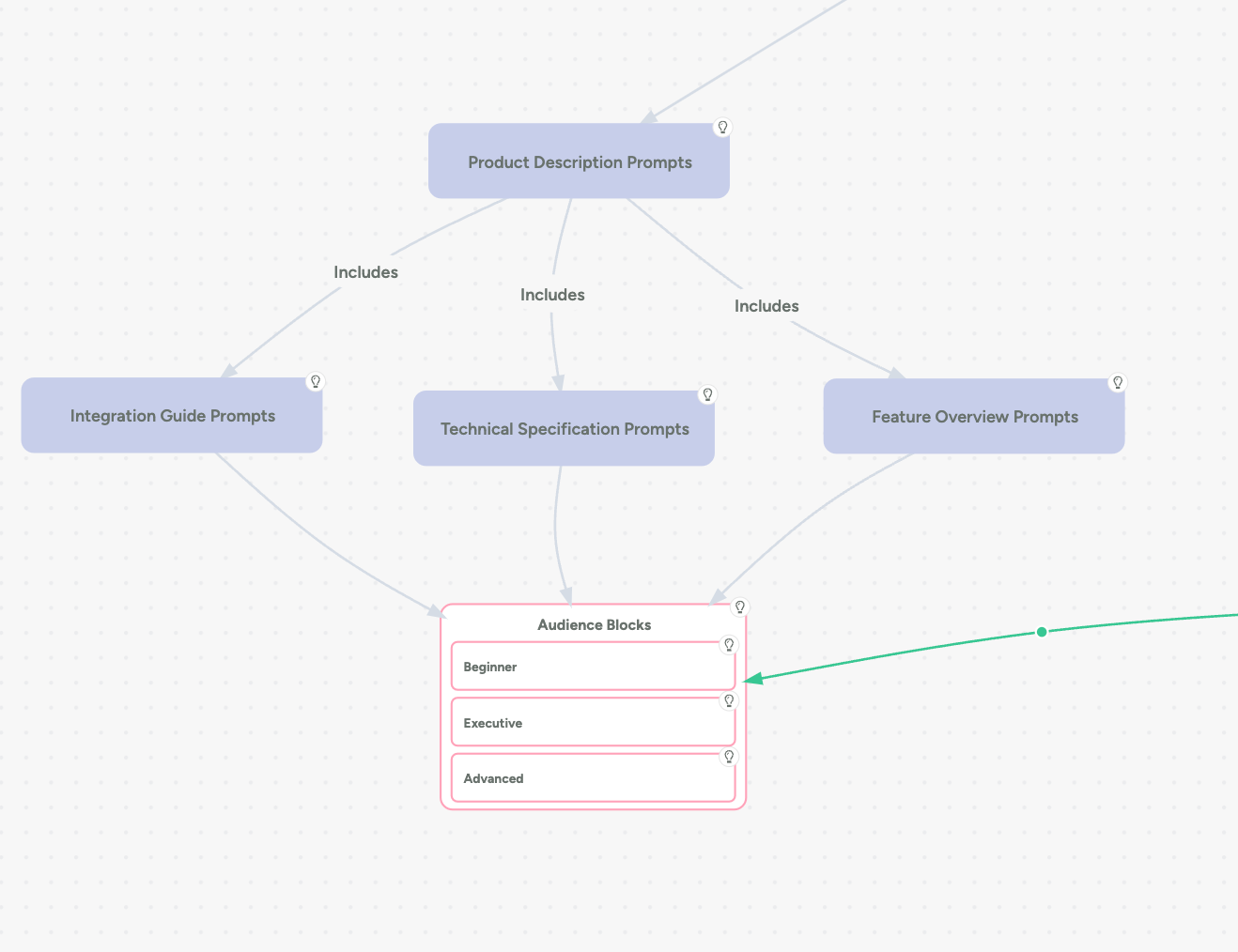
Knowledge graphs take this concept even further by allowing us to specify the nature of these relationships. In a knowledge graph, you don't just show that prompts are connected – you describe how they're connected. A "tone guidance" prompt might "inform" multiple content creation prompts, while "audience persona" prompts "constrains" how those same prompts operate.
Let's look at how this might work in practice. Consider these relationship types in your prompt taxonomy:
Hierarchical Relationships: A high-level "brand voice" prompt might contain or govern several more specific tone and style prompts. Just as the produce department contains the fruit section, which contains the apple display.
Adjacent Relationships: Your "product feature description" prompt naturally connects to both "technical specification" prompts and "benefit statement" prompts. These adjacent prompts often work together but serve different purposes, like finding pasta near sauce.
Workflow Relationships: Some prompts naturally sequence together. A "research synthesis" prompt might feed into an "outline generation" prompt, which then connects to various drafting prompts. This is similar to how a grocery store might organize ingredients in the order you'll use them in a recipe.
Functional Relationships: Prompts that serve similar purposes might be grouped together even if they're used in different contexts. All your "audience analysis" prompts might be connected, whether they're used for blog posts, email campaigns, or social media.
Creating a visual map of these relationships serves several purposes:
It helps you identify gaps in your prompt collection
It reveals opportunities for prompt reuse across different contexts
It makes it easier to train new team members on your prompt system
It supports the development of more sophisticated prompt workflows
You can start mapping these relationships with simple tools like paper and pencil, or digital mind mapping software like Miro or Context Mind. As your system grows more complex, you might want to explore dedicated knowledge graph tools (like Anytype) that can help you manage and visualize more sophisticated relationship networks.
Remember that, like a grocery store's layout, your relationship map should reflect how people actually work with prompts. Pay attention to which prompts tend to be used together, which ones support or depend on each other, and which ones might benefit from being more closely connected.
In our next several sections, we'll explore exactly how to build your own taxonomy from the ground up. I'll guide you through practical exercises and strategies for organizing your prompts, including:
A step-by-step process for identifying your key prompt categories
Common pitfalls to avoid when structuring your taxonomy
Real examples of taxonomies for different content scenarios
Advanced techniques for evolving your system as your needs grow
➡️ Paid subscribers get access to these detailed guides along with exercises and examples to help implement your own prompt taxonomy.
Building Your Own Taxonomy
The key to creating an effective taxonomy is starting with your actual content needs rather than trying to impose an abstract organizational system. Let's walk through how to develop a taxonomy that truly serves your work.
The most effective taxonomies grow from your actual content operations rather than theoretical frameworks.
Let's walk through how to develop a taxonomy that truly serves your work, using practical steps and real-world examples.
Step 1: Content Audit and Analysis
Start by examining your existing content operations. Take a week to document the types of content you create and the prompts you already use. Pay special attention to:
Your regular content tasks (daily, weekly, monthly)
Repeated patterns in your workflow
Common combinations of content types
Existing organizational systems, formal or informal
For example, a technical documentation team might discover they regularly create:
New feature documentation every two weeks
Monthly product updates
Quarterly major release documentation
Ongoing support documentation
Regular API documentation updates
This audit reveals natural patterns that will inform your taxonomy. You might notice that feature documentation always requires certain types of prompts, while support documentation needs a different set.
Step 2: Identifying Primary Categories
Based on your audit, identify 3-5 main categories that encompass your core content operations. Don't try to account for every possibility – focus on your most common and crucial needs.
For example, our documentation team might identify these primary categories:
Product Documentation Prompts: For core product features and functionality
Process Documentation Prompts: For procedures and workflows
Reference Documentation Prompts: For technical specifications and APIs Support
Documentation Prompts: For troubleshooting and user assistance
Step 3: Developing Subcategories
Within each primary category, create logical groupings based on how you actually use these prompts. Think about:
Common workflows
Related content types
Shared characteristics
Typical use cases
For our documentation team, Product Documentation Prompts might include:
Feature Description Prompts
Overview Prompts
Functionality Prompts
Integration Prompts
User Guide Prompts
Getting Started Prompts
Basic Usage Prompts
Advanced Usage Prompts
Configuration Prompts
Setup Prompts
Customization Prompts
Migration Prompts
Step 4: Testing Your Structure
Before fully implementing your taxonomy, test it with real scenarios. Take your last few content projects and try to categorize them within your new structure. Ask yourself:
Can I easily find where each prompt should go?
Do the categories make intuitive sense?
Are there prompts that don't fit anywhere?
Are there categories that seem redundant?
This testing often reveals gaps or overlaps in your initial structure. For instance, our documentation team might realize they need a separate category for version-specific documentation that doesn't fit neatly into their current categories.
Your taxonomy should evolve as your content operations grow and change. Plan for regular reviews and updates.
Making Your Taxonomy Work: Real-World Case Studies
Let's examine how three different organizations developed taxonomies that transformed their content operations.
Each case study reveals different approaches to organizing prompts and the thinking behind their choices.
Technical Documentation Team: Breaking Down Product Complexity
A software company's documentation team faced a common challenge: their product had grown from a single application to a complex ecosystem of interconnected tools. Their initial folder-based system of prompts no longer served their needs.
Through their content audit, they discovered that 80% of their documentation fell into three main use cases: helping users get started, solving specific problems, and providing technical reference material. However, each of these needs appeared across different product components.
Their solution was to create a two-dimensional taxonomy that addressed both product components and documentation types:
Product Components:
Core Application
Mobile Integration
API Services
Admin Tools
Analytics Suite
Documentation Types:
First-Time Setup
Basic Usage
Advanced Features
Troubleshooting
Technical Reference
Instead of choosing one hierarchy over the other, they created prompt collections that combined both dimensions. For example, "First-Time Setup - Mobile Integration" had its own set of prompts distinct from "First-Time Setup - Core Application." This allowed writers to quickly locate relevant prompts while maintaining consistency across similar documentation types.
The team also noticed that certain technical concepts appeared across multiple areas. Rather than duplicate these explanations, they created a separate category of "Concept Explanation Prompts" that could be referenced and adapted across different contexts. This significantly improved consistency in how complex ideas were explained throughout their documentation.
Educational Content Creator: Scaling Personal Expertise
An experienced educator who created online courses faced a different challenge. She needed to scale her content creation while maintaining the engaging teaching style that made her courses successful.
Her initial attempt to organize prompts by subject matter (mathematics, science, language arts) proved ineffective because it didn't capture her teaching methodology. Through analysis of her most successful lessons, she realized her actual content pattern followed a consistent pedagogical approach:
Engagement Phase:
Real-World Connection Prompts
Problem-Posing Prompts
Prior Knowledge Activation Prompts
Instruction Phase:
Concept Introduction Prompts
Worked Example Prompts
Common Misconception Prompts
Practice Phase:
Guided Practice Prompts
Independent Work Prompts
Extension Activity Prompts
Assessment Phase:
Understanding Check Prompts
Application Task Prompts
Reflection Prompts
This structure allowed her to create consistent, high-quality content across different subjects while maintaining her distinctive teaching approach. She could take a single concept introduction prompt and adapt it for different subjects while keeping the core instructional strategy intact.
What made this taxonomy particularly effective was how it captured not just content types but teaching methodology. Each prompt category included specific guidance about tone, pacing, and pedagogical techniques that had proven successful in her courses.
Content Marketing Agency: Supporting Creative Flexibility
A marketing agency initially struggled to create a taxonomy that wouldn't stifle their creative process. Their first attempt at organizing prompts by content type (blogs, social media, emails) felt too restrictive and didn't support their creative workflow.
Through careful observation of their most successful projects, they realized their creative process followed a consistent pattern even though the final outputs varied widely. This led them to develop a taxonomy based on creative stages rather than output types:
Discovery Phase:
Audience Insight Prompts
Trend Analysis Prompts
Competitive Research Prompts
Concept Development:
Story Angle Prompts
Voice Exploration Prompts
Hook Development Prompts
Content Adaptation:
Format Translation Prompts
Platform Optimization Prompts
Tone Calibration Prompts
What made this taxonomy effective was its focus on the creative process rather than final deliverables. Each category contained prompts that could be applied to any type of content while maintaining creative flexibility. The system supported rather than constrained their creative work.
The agency also created a set of "Style Bridge" prompts that helped maintain brand voice across different formats and platforms. These prompts helped writers adapt content while preserving the client's brand identity.
Each of these case studies demonstrates a different approach to taxonomy development, but they share common principles: they're built on actual work patterns, they support rather than restrict the creative process, and they evolve based on practical needs rather than theoretical ideals.
The key lesson from these examples is that effective taxonomies emerge from careful analysis of your actual work patterns and needs. They should reflect how you and your team think about and create content, not force you into artificial categories that don't match your workflow.
Common Pitfalls in Taxonomy Development
When developing a prompt taxonomy, several common challenges can derail even well-intentioned efforts. Let's explore these pitfalls in depth and learn how to avoid them.
Over-categorization: The Temptation of Perfect Organization
Many teams fall into the trap of creating too many categories in pursuit of perfect organization. This often stems from a desire to account for every possible scenario or variation in their content. For instance, a technical documentation team might create separate categories for every feature, every user type, and every use case, resulting in a sprawling taxonomy that's harder to use than no organization at all.
This becomes particularly problematic when we consider how our brains process information. Research in cognitive psychology shows that humans can effectively manage between five and nine distinct categories at any given level of organization. Beyond this, we start to experience cognitive overload, making it harder to find what we need quickly.
To avoid this pitfall, start with broader categories and only subdivide when you have at least three items that clearly belong together in a subcategory. If you find yourself creating a category for just one or two prompts, step back and ask whether these prompts might fit better within an existing category.
Static Structures: The Illusion of Permanence
Another common mistake is treating a taxonomy as a fixed structure that, once created, should remain unchanged. This mindset often comes from traditional documentation systems or file organization methods where stability was a virtue.
However, prompt taxonomies need to be living systems that evolve with your content operations. The rapid evolution of AI capabilities and changing content needs means your taxonomy must remain flexible. Yet this doesn't mean constant chaos - the key is building in controlled flexibility from the start.
For example, rather than creating rigid category names like "2024 Product Documentation Prompts," use more adaptable names like "Product Documentation Prompts" with version tracking built into your prompt metadata. This allows your structure to evolve without requiring complete reorganization.
The Isolation Trap: Forgetting the Human Element
Perhaps the most subtle yet significant pitfall is creating a taxonomy in isolation from the people who will actually use it. This often happens when information architects or content strategists design systems based on theoretical best practices without considering the daily workflows of content creators.
Consider this real-world example: A marketing team implemented a theoretically perfect taxonomy based on marketing funnel stages (awareness, consideration, decision). While this made sense from a strategic perspective, their writers thought in terms of content types and audience segments. The disconnect created friction in daily operations, with team members struggling to translate their natural workflow into the imposed structure.
The solution isn't to abandon strategic organization but to create bridges between theoretical frameworks and practical usage. This might mean implementing multiple access paths to the same prompts or creating cross-references that connect strategic categories with task-based ones.
The Complexity Spiral: When Good Intentions Go Wrong
Sometimes teams create sophisticated systems to handle every edge case and exception, leading to what I call the "complexity spiral." This occurs when attempts to solve one organizational challenge create new complications that require additional solutions.
For example, a documentation team might start with a simple category for "Product Features." They then add subcategories for different product versions, then sub-subcategories for different user types, then cross-references for related features, and so on. Each addition seems logical in isolation, but the cumulative effect is a system too complex for practical use.
To avoid the complexity spiral, implement the "two-level rule": Users should be able to find any prompt within two levels of navigation. If it takes more clicks than that, your system needs simplification, not more organization.
Neglecting the Learning Curve
A well-designed taxonomy should be intuitive enough that new team members can start using it effectively with minimal training. However, many organizations underestimate the learning curve associated with their organizational systems.
Think about how you learned to navigate a grocery store. The basic categories (produce, dairy, meat) are intuitive, but finding specific items might require learning where they're placed. Your prompt taxonomy should follow a similar principle - obvious main categories with logical, learnable subcategories.
Create clear documentation explaining not just the structure but the thinking behind it. Include examples of common scenarios and how to navigate them. Consider creating "quick start guides" that focus on the most frequently used prompts and categories.
By understanding and actively working to avoid these pitfalls, you can create a taxonomy that truly serves your team's needs while remaining flexible enough to grow with your content operations. Remember, the goal isn't perfection but practical usefulness - a system that makes your team more efficient and effective in their daily work.
From Organization to Implementation
Creating a taxonomy is much like designing the blueprint for a building - it's essential but it's just the beginning. The true test comes in how that design serves the people who use it every day. As we've explored through our grocery store analogy and real-world case studies, the most effective taxonomies aren't just organizational systems - they're tools that enhance how we work with AI and create content.
Remember that your taxonomy doesn't need to be perfect from the start. Just as grocery stores periodically reorganize their layouts based on shopping patterns and customer feedback, your prompt organization system should evolve with your team's needs and workflows. The key is to start with a clear, intuitive structure that makes sense for your current operations while leaving room for growth and adaptation.
In our next lesson, we'll explore how to transform your taxonomy into a working prompt library. We'll look at practical ways to implement your organizational system, including how to create templates that make your prompts more versatile and reusable. You'll learn how to pair different types of prompts together to create more sophisticated content workflows, all while maintaining the clear organization you've established through your taxonomy.
The most successful taxonomies aren't the most elaborate or theoretically perfect - they're the ones that best support the actual work of content creation. Start building yours with that goal in mind, and you'll be well on your way to more systematic, effective prompt operations.
📎 Need a little help getting started. Check out this worksheet!
Take a moment and share some of the categories you came up with in the comments. Or if you have any questions, let me know. I know this one is a little more complex!