



An AGENTS.md file can grow incrementally until your AI reads 300 lines at the start of every session, and a contradictory rule can sit in there for months without being noticed. Sorting mine by five information types showed me where the length came from; splitting the reasoning out of it showed me the stale rule I’d been carrying since September.
Back in September, my AI wrote a class plan that talked to me instead of my students.
It was a small thing. One table cell in the middle of a lesson, telling me to use “your own CAKE example,” sitting on a page students read.
Nobody was really confused. Nobody emailed me about it. But that page was published, and the instruction on it was aimed at the wrong person. Just a bit weird, and certainly not what I wanted.
The fix wasn’t a better prompt, though. It was one line in one file.
Here is some background on the setup for context.
I keep my course material in Obsidian as plain Markdown files: syllabi, class plans, assignment sheets, a schedule, a pile of working notes.
Some of those files are published as an actual website my students use, through Obsidian Publish, which turns the folder into pages without changing the files. So the same folder is both my private workspace and a live site, and a Markdown file I edit on Tuesday is a page students read on Thursday.
My AI works directly in that folder. I do this so that I can use AI to manage all my course materials, instead of manually cutting and pasting or changing dates myself (all tedious things I hate to do).
If you work with AI inside a folder of Markdown files, you probably have an AGENTS.md file, or a CLAUDE.md, or something like it. It sits at the top of the folder and tells the AI how to work there. The AI reads it first, before it files a note or runs a skill. So far, I keep four:
my main knowledge base,
the teaching vault that publishes those course pages,
a small vault for meal planning, and
an experimental research knowledge base (more on that to come).
In September I rewrote the first three. I’ll use the teaching one here, because it’s the least private and shows the mistakes most clearly.
A question I answer twice costs more than a rule I wrote once, and the reasoning the model does instead is the most expensive way of using tokens.
Why do AGENTS files go wrong?
In short, my AGENT docs started to get messy.
Most AGENT files grow incrementally. The first version is really a draft that you correct, as you work with agentic workflows.
By this time, my file was 200 lines long. Folder descriptions sat next to style rules, a note about a broken email tool sat next to the publishing workflow, and the AI read all of it at the start of every session whether it needed it or not.
That’s a content problem, and it’s one structured content has already solved.
The skills I build now are organized by five information types: Concept, Reference, Principle, Process, and Task.
I try to keep things in a logical order. The AI sees what it’s making before it learns the rules, and the rules before the steps.
So I tried the same sort on my AGENTS files. I didn’t necessarily rewrite anything, but rearranged the information. Each section moved under the heading that matched the job it was doing.
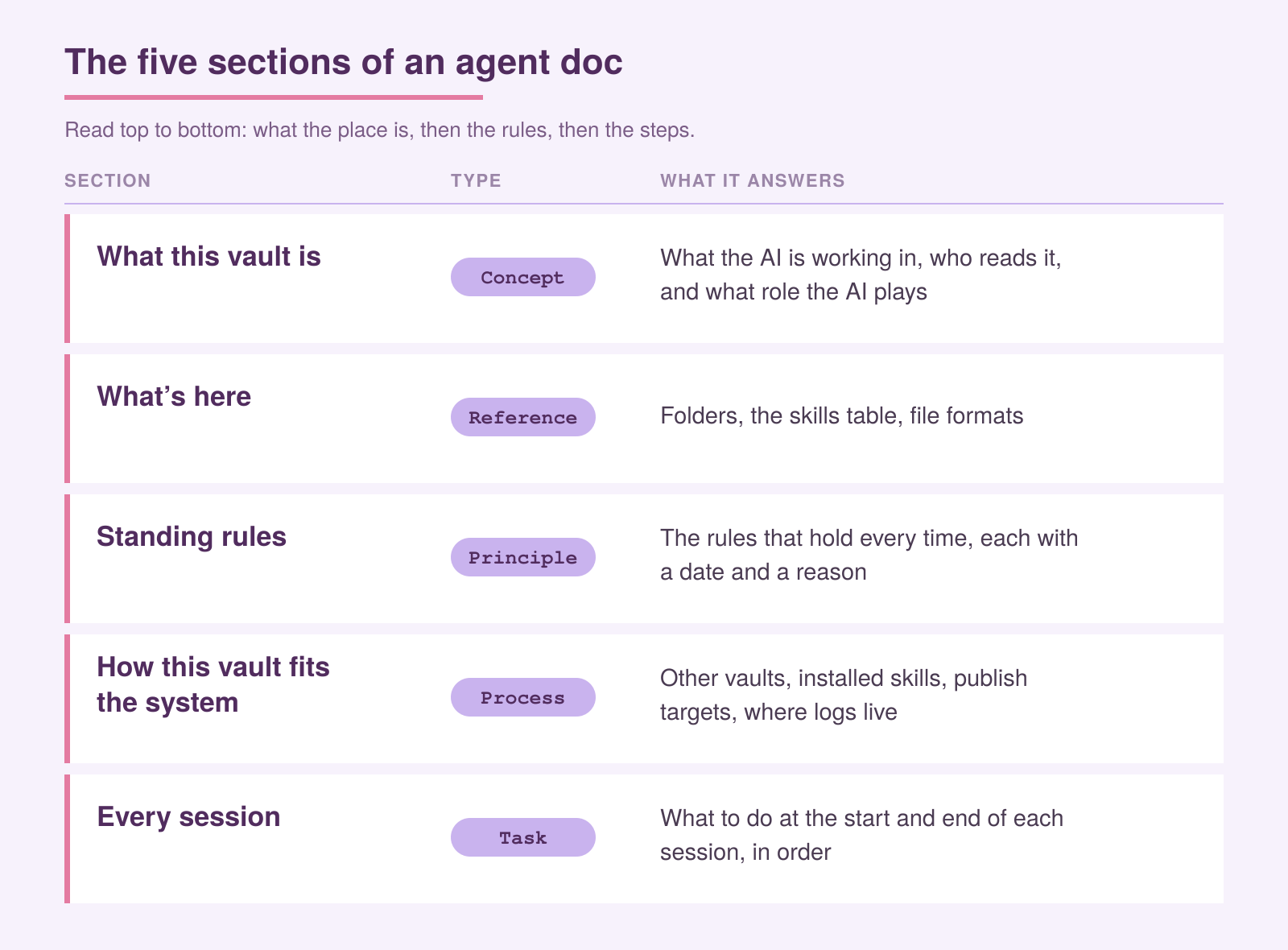
Sorting didn’t shrink the file. It got longer, closer to 300 lines, since I kept adding rules as I went.
It did show me where the length was coming from. A rule now lives under Standing rules and a folder under What’s here. So when a section runs long, I can see what kind of content is making it long... and so can the AI.
What are some AGENTS.md best practices?
Now I keep three habits when working with AGENT files. All three protect the same thing: a file that gets read in full every session has to stay short enough that reading it in full is reasonable and necessary.
Date every rule and say why. Most standing rules start as a correction. Something goes wrong, you tell the AI not to do it again, and that correction becomes a line in the file. Put the date and the failure in the line with it.
For example, one of my teaching rules says nothing is due during an official break. Written flat, that’s an instruction about labels, telling the AI to check which dates are marked as breaks and keep deadlines off them. The version in my file carries the date I added it, October 6, and what prompted it — I’d set a case study due on fall break and hadn’t noticed until a student would have.
That reason tells the AI what the rule is protecting, which is time off, not a label. So it now catches cases I never wrote down. A grace period that ends during a break. A project pushed so late that moving it compresses everything after it. Neither of those is in the rule, but both follow from the reason.
Keep a skills table. This was a bit of a surprise. When I moved skills out of the Claude app and into my vault, I realized the AI had no way to know they existed. An installed skill reaches the AI through its description. A skill sitting in a vault folder has no such channel. A small table in the AGENTS file (skill name, what it does, the phrases that should trigger it) gives the AI the same signal.
Point, don’t copy. When a topic already has its own document, link to it in one line instead of restating it.
This is the one I’d been ignoring in my own file.
What changed in practice?
My teaching vault is the cleanest example. Its standing rules are all real corrections:
public pages can’t use database plugins, because Obsidian Publish doesn’t render them,
anything meant for me goes in a hidden comment instead of the page students read, and
no student names anywhere.
Each one carries the date it was added.
Maybe the most important section is the task breakdown:
Read this file, then the task list and the last few session logs, and tell me what’s still open.
Match what I asked for against the skills table.
When a class plan, assignment sheet, or due date changes, update that course’s schedule and check the course home page in the same pass.
Before committing new prose, run the slop check.
If you changed anything the published site serves, end with a bold reminder to publish.
Write a session log before finishing.
Concept, Reference, Principle, and Process all tell the AI what’s true. This one tells it what order to work in, which is where things actually go wrong.
Step three is where content drift happens.
Students treat the course home page as their front door, so one changed due date has to reach three files or the pages become out of sync.
Step five is there because publishing is a manual button I forget to press, and an edit I never published is the same as an edit I never made.
What happened when I took my own advice
Writing all this down made me notice I wasn’t following my own third rule.
The email section was the clearest case. I send out weekly plans to students every Monday via email, using a Claude connection with Apple Mail.
Three lines about drafting in Apple Mail and hyperlinking the link text sat under roughly ten lines of notes on which mail tool calls fail and what their error messages say.
All of that is worth keeping. None of it is worth reading at the start of every session.
So this week I split the file. The reasoning behind each rule moved into a separate archive note, which the AI can look up when it needs to decide whether a rule covers a case the rule doesn’t name. For example, the weekly posting procedure moved to its own reference note.
Each rule stayed exactly where it was, with its date and a one-line reason.
The file went from about 6,500 words to 3,500, and from just over 300 lines to just over 200. Not one rule left it. What left was the reasoning, three procedures, and two frontmatter specs, all of which now live in files the AI opens only when it needs them.
This turned up something else for me. Buried in those ten lines about mail tooling was an instruction saying my mail client is Outlook. It isn’t, and hasn’t been for months. I use Apple Mail to draft emails, because my university account won’t connect to Outlook at all.
The correct rule was sitting in a different file the whole time, and the two had been contradicting each other since September.
So a long file gives a stale rule somewhere to hide.
The newest rule in the file is a day old. I found a folder called “Claude outputs” at the root of the teaching vault, holding AI test runs from weeks ago that I’d never looked at again.
I deleted it, then wrote the rule: don’t create that folder, file output next to whatever it belongs to, and when the right home isn’t obvious, ask me before writing the file. Dated, with the reason attached, like the rest.
Three thousand words of settled decisions read once at the start is cheaper than asking a model to infer the same decisions on the fly, and I get the decision I actually made instead of a plausible one.
How does this compare to the usual advice?
Most of the guidance written about these files is aimed at code repositories, and it converges on one point: keep the file short and point to other documents for the detail.
The length targets run lower than where I started, commonly under 200 lines, sometimes under 100, with some teams claiming 60. At just over 200 I’m inside the looser ones now and still over the strict ones.
Advice written for a code repository can assume the agent reads the code. Conventions are inferable from the files, commands either run or fail, and a linter or a hook can enforce what the file merely advises. So the file can be minimal, and the guides are right that it should hold what an agent cannot work out on its own.
A vault of writing gives an agent much less to work out. Nothing in my folder tells it that one page is read by students and the next one is mine, or that a deadline shouldn’t land during a break, or that a note addressed to me doesn’t belong in a table cell.
There’s no test to fail and nothing to lint. Those rules exist only if they’re written down, and most of them need a sentence of reasoning rather than a command.
Which is why the Concept section carries so much weight in mine and so little in the examples I found. A repository’s file can open with one line about the stack. Mine has to establish who reads what before any rule after it means anything.
While splitting a procedure out into a skill turns out to be standard advice, the recommended structures are flat topic lists: stack, layout, commands, conventions, testing.
This is useful, but a list of topics doesn’t tell you what kind of statement belongs in each section, which was my actual problem.
But there is one thing the token-economy argument misses, though.
Yes, every line in the file is a cost, but inference also costs tokens. An agent that doesn’t know a deadline shouldn’t land on a break has to work it out from what’s around it, or ask me, or get it wrong and get corrected.
A question I answer twice costs more than a rule I wrote once, and the reasoning the model does instead is the most expensive way of using tokens.
So a well-structured file lets me turn the reasoning budget down. The judgment is already sitting there, dated and explained, rather than getting re-derived every session.
Three thousand words of settled decisions read once at the start is cheaper than asking a model to infer the same decisions on the fly, and I get the decision I actually made instead of a plausible one.
Try it
Start small. Open your AGENTS file and sort what’s already there under those five headings. Don’t write anything new. See what’s missing.
Below is the whole thing: the actual AGENTS file from my teaching vault, as it stands today, split and dated rules and all. It’s one of several agent docs and skills in my Structured Skills Library, which paid subscribers get access to. I’ve also added a template there.
That file governs the site you can see here. Its worth reading the two side by side, since most of the rules in it exist because of something on those pages.
Read it as a worked example rather than a template to copy. The rules in it are answers to problems my courses gave me, and yours will give you different ones.